Australian Tax Invoice Requirements: ATO Rules Explained
What an Australian tax invoice must include under ATO rules: the 7 details, the $82.50 and $1,000 thresholds, GST rounding, and a worked example.
An Australian tax invoice must make clear that it is a tax invoice and show the seller's identity and ABN, the issue date, a description with quantity and price, the GST amount, and which items are taxable. For sales of $1,000 or more it must also show the buyer's identity or ABN.
Last reviewed: 18 October 2026 against ATO guidance on tax invoices.
When you must issue a tax invoice
Tax invoices belong to the GST system, and GST in Australia is 10% on most goods and services (How GST works). Businesses registered for GST include it in their prices and issue tax invoices for their taxable sales.
Registration is compulsory once your GST turnover reaches $75,000, or is expected to ($150,000 for non-profits). Some businesses must register whatever their turnover: taxi and ride-sourcing drivers, people earning through the sharing economy or digital platforms, and anyone who wants to claim fuel tax credits. You need an ABN first, and you have 21 days to register once you are required to (Registering for GST).
Once registered, the core rule is simple: if a customer asks for a tax invoice, you must provide one within 28 days. The only exception is a sale of $82.50 or less, including GST.
The 7 details every tax invoice needs
For a taxable sale under $1,000, the ATO requires the invoice to contain enough information to work out seven things:
- That the document is meant to be a tax invoice.
- Who the seller is.
- The seller's ABN.
- The date it was issued.
- A short description of what was sold, with the quantity (where it applies) and the price.
- The GST amount, if any.
- How far each sale on the invoice is taxable.
For detail 6 you have two options. You can show the GST as a separate figure, or, when the GST is exactly one-eleventh of the total price, you can print a statement such as "Total price includes GST" instead. The statement is an alternative, not an extra: if your invoice already shows the GST amount, you don't need it.
The ATO's ruling GSTR 2013/1 covers each requirement in more depth.
Tax invoices for sales of $1,000 or more
From $1,000 the invoice must also identify the buyer, either by name or by ABN. An invoice that meets this stricter standard also works for smaller sales, so one template can cover all of them.
The two thresholds together:
- $82.50 or less, including GST: you don't have to provide a tax invoice, even on request.
- More than $82.50 and under $1,000: the seven details, within 28 days of a request.
- $1,000 or more: the seven details plus the buyer's identity or ABN.
Worked example: an Australian tax invoice line by line
A fictional sole trader, Northgate Web Development (ABN 12 345 678 901, example only), bills a fictional company, Brightway Example Pty Ltd (ABN 98 765 432 109, example only). Invoice INV-2026-018 was issued on 1 October 2026. The sale is over $1,000, so the buyer's ABN is on the invoice. Amounts appear exactly as Invoice Builder prints them.
| Qty | Description | Unit price (excl. GST) | Net | GST rate | GST |
|---|---|---|---|---|---|
| 10 h | Website development | A$ 120.00 | A$ 1,200.00 | 10% | A$ 120.00 |
| 1 | Hosting setup (12 months) | A$ 300.00 | A$ 300.00 | 10% | A$ 30.00 |
| Subtotal excluding GST | A$ 1,500.00 | ||||
| GST | A$ 150.00 | ||||
| Amount due | A$ 1,650.00 | ||||
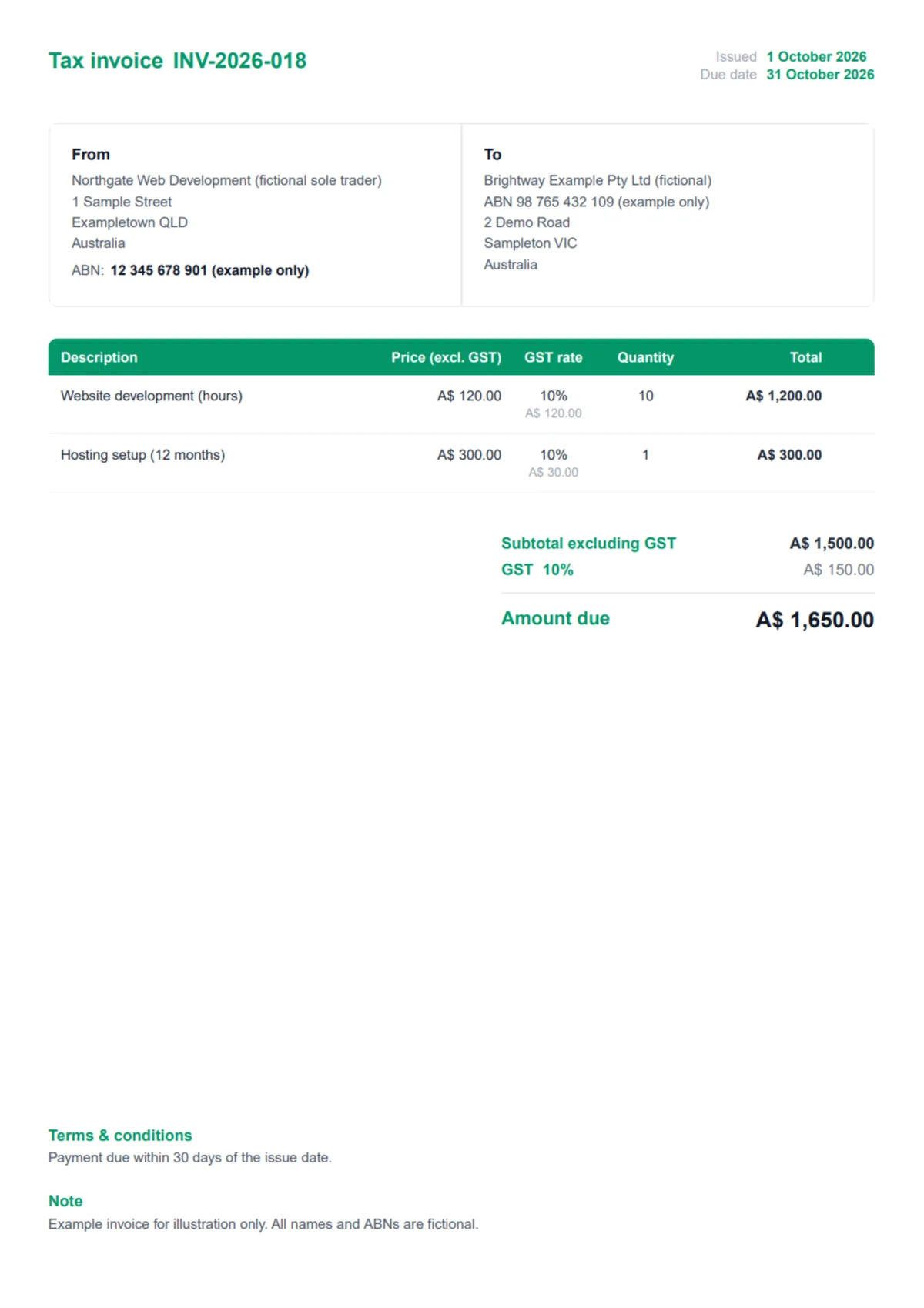
Download the example tax invoice (PDF), built with Invoice Builder.
To set up Invoice Builder for Australian invoices once:
- Choose AUD (A$) as the currency.
- Click each label to rename it: INVOICE to Tax invoice, VAT / Tax ID to ABN, Price (excl. VAT) to Price (excl. GST), VAT rate to GST rate, Subtotal excluding VAT to Subtotal excluding GST, and VAT to GST.
- Set the rate on the first line to 10%. New lines copy the rate of the line above.
- Keep Remember my settings switched on. New invoices then start with your labels, currency and 10% rate, and your labels come back if you switch the invoice language and return.
- Type the buyer's name and ABN in the To field for sales of $1,000 or more.
Two limits to know: prices are entered excluding GST, so the tool can't show GST-inclusive line prices, and it exports PDF only, not Peppol eInvoices.
GST-free and mixed sales on one invoice
Some sales carry no GST. Most basic food, some education courses, some medical and health services, and exports are among the GST-free categories the ATO lists (GST-free sales).
When one invoice mixes taxable and non-taxable items, it has to make clear which items are taxable, and still show each taxable sale, the GST payable and the total payable. In Invoice Builder, give the GST-free line a 0% rate and add "(GST-free)" to its description, for example "Course workbook (GST-free)". The rate alone says 0%; the word makes the status unmistakable for your customer.
How GST rounding works on invoices
When GST comes to a fraction of a cent, the ATO's rounding rules apply. With a single taxable sale, round to the nearest cent, with half a cent rounding up. With several taxable sales, you choose between two methods:
- Total invoice rule: total the GST, then round. When all GST on the invoice is exactly one-eleventh of the price, you can add up the GST-exclusive values, work out GST on that sum and round once.
- Taxable sale rule (the ATO also calls it the taxable supply rule): work out GST on each sale, round where your system can't hold more decimals, then add the amounts up and round the total.
The two can differ by a cent. Take three separate items at A$ 10.05 each, excluding GST:
| Method | Working | GST |
|---|---|---|
| Total invoice rule | A$ 30.15 × 10% = A$ 3.015, rounded once | A$ 3.02 |
| Taxable sale rule, each line rounded to the cent | A$ 1.005 → A$ 1.01, three times | A$ 3.03 |
Invoice Builder uses the total invoice rule, so it charges A$ 3.02. On those three lines it prints per-line GST of A$ 1.01, A$ 1.01 and A$ 1.00. That isn't an error: the tool rounds the invoice total once and then shares it across the lines, so the line figures always add up to the GST you actually charge. The ATO also notes that you and your customer don't have to use the same rule.
A note from building this tool: when I set Invoice Builder up for Australian invoices, I found that renaming the labels from VAT to GST didn't stick. Every new invoice or language switch brought the old wording back, which meant redoing the same six edits each time. I changed the tool so renamed labels are saved with your settings and come back automatically. While checking the GST maths, I also noticed that the GST shown on individual lines can differ by a cent from what you'd get rounding each line on its own. That isn't an error: the tool works out GST on the invoice total and rounds once, which is the ATO's total invoice rule. If you check an invoice by hand line by line, expect the occasional one-cent difference.
Digital invoices and Peppol eInvoicing
A tax invoice doesn't have to be on paper. Emailing a PDF is fine, provided the document contains every required detail. Keep copies: tax invoices are part of the GST records you must hold for five years (GST records).
Australia has adopted Peppol as its eInvoicing standard: invoices travel directly between the seller's and buyer's software. Because some eInvoices don't carry words like "Tax invoice", the ATO accepts that an eInvoice is intended to be a tax invoice if it follows the A-NZ Invoice Specification under Peppol and includes all mandatory data. To send eInvoices you register on the Peppol network through eInvoicing Ready software or a service provider (eInvoicing for businesses). Invoice Builder creates PDF invoices, not Peppol eInvoices.
Common Australian tax invoice mistakes
- No ABN. Your ABN is one of the seven details on every tax invoice.
- No buyer details on a sale of $1,000 or more. Add the buyer's name or ABN.
- GST-free items not marked. On a mixed invoice, make it obvious which lines are taxable.
- Adding GST before you're registered. Only businesses registered for GST, or required to be, make taxable sales.
- Nothing showing it is a tax invoice. A PDF has to make that clear; the ATO's allowance for missing wording applies to Peppol eInvoices that follow the A-NZ specification.
- Missing the 28-day window after a customer asks for a tax invoice.
To compare with another system, see UK VAT invoice requirements or GST/HST invoice requirements in Canada, where the details required rise at $100 and $500, or US invoice requirements, where sales tax is set by each state. For the general picture, read the VAT invoice guide and what to include on an invoice.
Create an Australian tax invoice free
Set A$ and 10% GST once, add your ABN and your buyer's, and export a PDF tax invoice. No signup required.
Create an Australian tax invoice freeFrequently asked questions
Do I need to issue a tax invoice for every sale?
No. If you are registered for GST, you have to provide a tax invoice when a customer asks for one, and you have 28 days from the request to do it. Sales of $82.50 or less, including GST, are exempt from that obligation. You can still issue one for smaller sales if your customer wants it.
What is the difference between a tax invoice under and over $1,000?
Both need the same seven details: tax invoice wording, your identity and ABN, the issue date, a description with quantity and price, the GST amount and how far each sale is taxable. From $1,000 the invoice must also show the buyer's identity or ABN. An invoice that meets the $1,000 rules is valid for smaller sales too.
Can I send a tax invoice as a PDF?
Yes. The ATO does not require paper. A tax invoice emailed as a PDF, or sent in another digital format, is valid as long as it contains all the required information. Keep your own copy: GST records, including tax invoices, have to be kept for five years. Peppol eInvoices are a separate, automated channel between accounting systems.
Can I issue a tax invoice if I'm not registered for GST?
The ATO links tax invoices to GST registration: registered businesses include GST in their prices and issue tax invoices for taxable sales, and a sale is only taxable if the seller is registered or required to be. If you reach the $75,000 GST turnover threshold, you must register within 21 days, or you may owe GST on past sales.
How long do I have to provide a tax invoice?
You have 28 days from the day the customer asks for it. The rule applies to sales above $82.50 including GST; below that amount you don't have to provide one. Sending the invoice when you make the sale avoids the request altogether, and for sales of $1,000 or more remember to include the buyer's identity or ABN.
Ready to Create Your Invoice?
Start generating professional invoices in seconds — completely free, no signup required.
Create Free Invoice NowNo account needed · Export to PDF · 100% free